
Setting up a reliable security system in Whitby is more than just a good idea – it’s a necessity for homes and businesses these days. With all the concerns about theft, trespassing, and property damage, you’re probably looking for some clear, practical guidance on how to go about it. So if you’re planning to put up some CCTV cameras in Whitby, its worth getting it right from the start so you don’t miss key areas.
This guide is designed to walk you through the whole process of planning, placing and installing CCTV cameras to get the best possible results. You’ll learn the simple steps you need to take, some smart tips for placement and what to avoid so your system works like a dream from day one.
Understanding CCTV Camera Installation in Whitby
CCTV camera installation is all about planning where to put your cameras, getting them connected and making sure they are covering all the right areas without any gaps. Both homeowners and business owners in Whitby use CCTV systems to keep an eye on things like entrances, driveways, parking areas and indoor spaces. When you install CCTV cameras in Whitby the goal is not just to put up some cameras on the wall – it’s to create a system that records clear footage, works 24/7 and fits in with the layout of the property.
Doing a proper CCTV installation really depends on what sort of cameras you choose, where you put them and what you need to cover. Outdoor cameras need to be able to withstand the elements, while indoor cameras are all about catching activity in places like hallways, cash points or entry points. Wired systems offer a stable connection while wireless options give you more flexibility if you’re just setting up a home or small office – but getting the right setup from the start is key to avoiding all sorts of problems further down the line.
Key points to understand before installing CCTV cameras:
- CCTV systems are used for crime prevention, monitoring, and evidence recording
- Camera placement affects coverage more than the number of cameras
- Lighting, height, and viewing angle impact video clarity
- Residential and commercial installation needs are different
- Proper planning improves long-term performance and reliability
Understanding these basics makes it easier to move forward with confidence and ensures your CCTV system delivers real protection instead of false security.
Things to Consider Before You Set Up CCTV Cameras in Whitby
Before you setup CCTV cameras in Whitby, careful planning helps avoid poor coverage and wasted cost. Every property is different, so the first step is to understand what you want to protect. Homes usually focus on doors, driveways, and backyards, while businesses often need coverage for entrances, parking areas, and indoor work zones. Clear goals make the installation camera surveillance process smoother and more effective.
Another key factor is choosing the right camera type and layout. Outdoor cameras must handle rain, snow, and low light, while indoor cameras should blend into the space without blocking views. Power source, internet strength, and storage options also matter. Thinking about these points early helps you build a system that works well today and stays useful in the future.
Important points to consider before installation:
- Identify high-risk areas such as entrances and blind spots
- Decide between wired or wireless installation camera systems
- Check lighting conditions for clear day and night recording
- Plan camera height and angle for full coverage
- Confirm power supply and internet connection availability
- Choose storage type such as DVR, NVR, or cloud recording
Taking time to plan these details ensures your CCTV setup delivers strong coverage, clear footage, and reliable performance from the start.
Step-by-Step Guide to Set Up CCTV Cameras in Whitby
Setting up a CCTV system becomes much easier when you follow a clear process. If you want to setup CCTV cameras in Whitby correctly, each step should focus on coverage, clarity, and reliability. Skipping steps often leads to blind spots or weak performance, so take time to complete each stage properly.
Step 1: Plan Camera Locations
Start by walking around your property and marking areas that need monitoring. Focus on main doors, driveways, side entrances, backyards, and indoor access points. Proper planning helps reduce blind spots and improves overall installation camera surveillance results.
Step 2: Choose the Right Camera Type
Select cameras based on location and purpose. Outdoor cameras should be weather-resistant and support night vision. Indoor cameras work best in hallways, stairways, and common areas. This choice directly affects video quality and coverage.
Step 3: Mount the Cameras Securely
Install cameras at a height that captures faces clearly while staying out of easy reach. Angle each camera to cover wide areas without pointing into neighbouring properties. Secure mounting ensures stable footage and long-term performance.
Step 4: Connect Power and Network
For wired systems, connect cameras to power and the DVR or NVR unit. For wireless systems, ensure a strong internet connection. Reliable power and network access are essential for smooth installation camera setup.
Step 5: Configure Recording and Settings
Set recording schedules, motion detection zones, and video quality levels. Adjust brightness and contrast to improve clarity during day and night. Proper settings help capture useful footage without missing important events.
Step 6: Test and Adjust Coverage
Check live video feeds from all cameras. Walk through monitored areas to confirm motion detection works correctly. Make small angle changes if needed to ensure full coverage before finalizing the setup.
Best CCTV Camera Placement Tips for Maximum Coverage
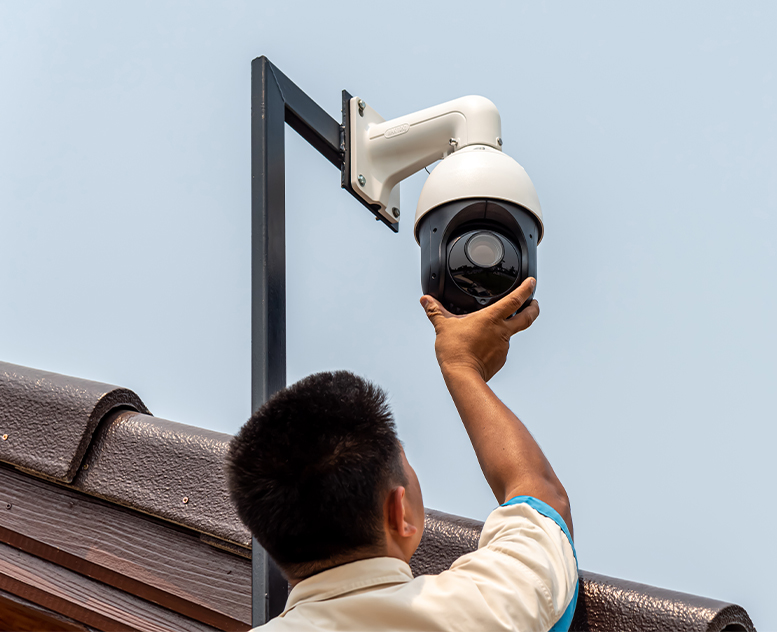
Correct camera placement plays a major role in how well your security system performs. Even the best equipment can fail if cameras are placed poorly. When you setup CCTV cameras in Whitby, smart positioning helps capture clear footage, reduce blind spots, and improve overall installation camera surveillance results.
Focus on Entry and Exit Points
Always place cameras near front doors, back doors, side entrances, and garage areas. These locations are the most common access points and should be monitored closely. Cameras should face toward people entering, not just the doorway itself.
Install Cameras at the Right Height
Mount cameras high enough to avoid tampering but low enough to capture clear facial details. A height of about 8 to 10 feet works well for most homes and businesses. Avoid placing cameras too high, as this can reduce image detail.
Cover Wide Areas Without Blind Spots
Angle cameras to cover as much space as possible without missing key areas. Overlapping camera views can help remove blind spots, especially in driveways, yards, and parking areas.
Consider Lighting and Night Visibility
Place cameras where there is enough light or use cameras with strong night vision camera. Avoid pointing cameras directly at bright lights, as glare can affect video quality during night recording.
Respect Privacy Boundaries
Aim cameras only at your property. Avoid recording neighbouring homes, windows, or private spaces. This ensures responsible installation camera surveillance and helps follow local privacy guidelines.
Using these placement tips helps ensure your CCTV system delivers clear footage, full coverage, and reliable protection for your property.
Legal Requirements for Installing CCTV Cameras in Whitby
Before you setup CCTV cameras in Whitby, it is important to understand the legal rules that apply in Ontario. CCTV systems are allowed for security purposes, but they must respect personal privacy. Whether you are installing cameras at a home or a business, the main rule is simple: record only what is necessary to protect your property.
Cameras should be aimed at your own entrances, driveways, parking areas, or indoor spaces. Recording public sidewalks, streets, or neighbouring properties should be avoided unless it is truly required for security. This applies to both residential and commercial installation camera surveillance systems. Audio recording is generally not allowed, so CCTV cameras should capture video only.
Key legal points you should follow:
- Use CCTV only for safety and security purposes
- Avoid recording areas beyond your property boundary
- Do not place cameras in private areas such as bathrooms or change rooms
- Inform people when surveillance is in use, especially at business locations
- Store recorded footage securely and limit access to authorized users only
Following these legal guidelines helps you stay compliant, build trust, and ensure your CCTV installation protects your property without creating privacy issues.
How to Test, Maintain, and Optimize Your CCTV System
Once you setup CCTV cameras in Whitby, regular testing and maintenance are important to keep the system working properly. A camera that is not recording clearly or misses motion alerts can reduce the value of your installation camera surveillance setup. Simple checks help confirm that every camera is doing its job.
Test Your CCTV Cameras Regularly
Check live footage from each camera to ensure the image is clear and stable. Walk through monitored areas to confirm motion detection works correctly. Review recorded footage during both day and night to verify visibility and coverage.
Maintain Cameras for Long-Term Performance
Clean camera lenses to remove dust, dirt, or snow that can block the view. Inspect cables, mounts, and power connections to ensure nothing is loose or damaged. For wireless systems, check internet strength and reconnect devices if needed.
Optimize Settings for Better Coverage
Adjust camera angles, brightness, and contrast to improve image quality. Set motion zones carefully to avoid false alerts from passing cars or trees. Update system software when available to improve security and performance.
Regular testing and small adjustments help your CCTV system deliver clear footage, reliable monitoring, and better protection for your property over time.
Common Mistakes to Avoid When Setting Up CCTV Cameras
Many security issues come from simple planning and setup errors. When you setup CCTV cameras in Whitby, avoiding common mistakes can save time, money, and frustration. A well-planned installation camera surveillance system works better and provides reliable coverage from day one.
Placing Cameras Without a Clear Plan
Installing cameras without mapping key areas often leads to blind spots. Always identify entrances, driveways, and high-risk zones before mounting any camera.
Mounting Cameras Too High or Too Low
Cameras placed too high may miss facial details, while low placement increases the risk of tampering. Proper height helps capture clear footage and improves coverage.
Ignoring Lighting Conditions
Poor lighting can reduce image quality, especially at night. Avoid aiming cameras toward bright lights or direct sunlight, as glare can affect recordings.
Relying Only on One Camera Angle
Using a single camera to cover a large area can leave gaps. Overlapping views provide better installation camera coverage and reduce missed activity.
Skipping Testing After Installation
Failing to test cameras after setup can leave problems unnoticed. Always check video clarity, motion detection, and recording settings once installation is complete.
Avoiding these mistakes helps ensure your CCTV system delivers strong security, clear recordings, and dependable performance.
Why Professional CCTV Installation in Whitby Ensures Better Coverage
Choosing professional help can make a clear difference in how well your security system performs. When experts setup CCTV cameras in Whitby, they start with a full site review to understand layout, lighting, and risk areas. This approach helps place cameras where they capture clear views, reduce blind spots, and deliver reliable installation camera surveillance across the property.
Professional installers also handle correct wiring, system settings, and camera angles with precision. They know how to balance coverage and privacy while following local rules. With proper testing and fine tuning, the system records clear footage during both day and night. This level of planning and setup often leads to stronger coverage, fewer issues, and long term peace of mind for homeowners and businesses alike.
Conclusion
Setting up a reliable security system takes more than just buying cameras. When you setup CCTV cameras in Whitby, proper planning, smart placement, and correct installation make a big difference in coverage and video quality. From choosing the right camera type to following legal rules in Ontario, each step helps improve safety. A well planned installation camera surveillance system reduces blind spots and captures clear footage day and night. Regular testing and maintenance keep the system working as expected. For larger properties or complex layouts, professional installation often delivers better results. With the right approach, CCTV cameras provide long term protection and peace of mind.
FAQs
-
How many CCTV cameras do I need for my property in Whitby?
The number of cameras depends on property size and layout. Most homes need cameras for main doors, driveways, and backyards. Businesses may require additional cameras for indoor areas and parking spaces. A proper site review helps decide the right number.
-
Can I setup CCTV cameras in Whitby by myself?
Yes, basic systems can be installed by homeowners with simple layouts. However, complex wiring, wide coverage needs, and system setup can be challenging. Professional installation camera services help avoid blind spots and setup errors.
-
Where should CCTV cameras be placed for best coverage?
Cameras should be placed at entry points, driveways, and high traffic areas. Proper height and angle help capture clear faces and movement. Overlapping views improve coverage and reduce missed activity.
-
Are CCTV cameras legal in Whitby, Ontario?
Yes, CCTV cameras are legal when used for security purposes. Cameras must focus on your own property and avoid private areas. Businesses should inform people that surveillance is in use.
-
How often should CCTV systems be tested and maintained?
CCTV systems should be checked every few months. Testing video quality, motion detection, and storage ensures reliable performance. Cleaning lenses and adjusting settings helps maintain clear recordings.
